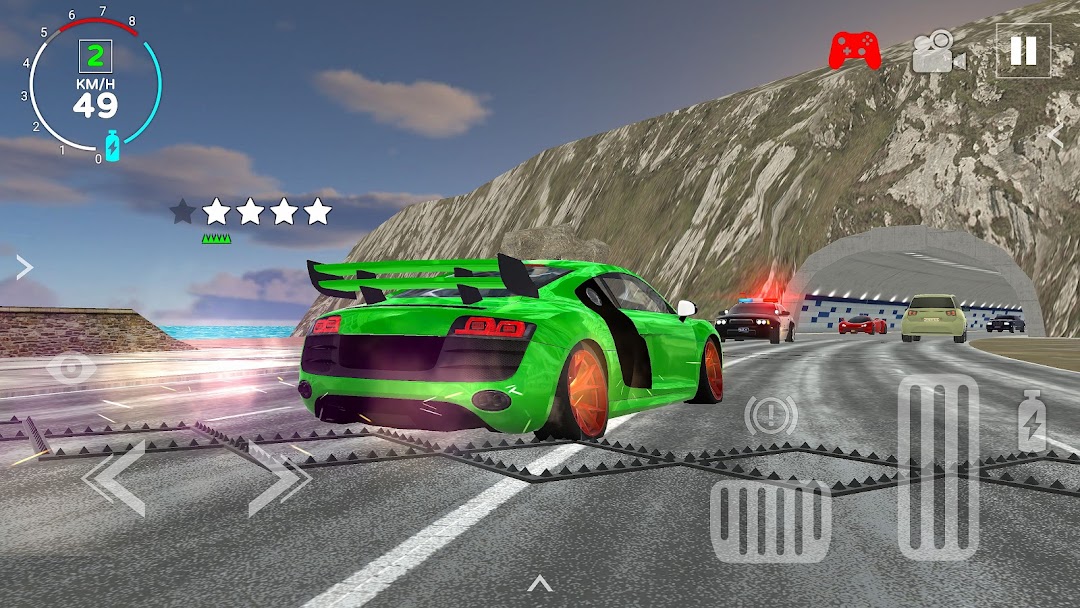
Mobimi Car Simulator ist ein Spiel Rennsport, das von Mobimi Games SRL entwickelt wurde. LDPlayer ist der beste Emulator, um Mobimi Car Simulator auf einem Computer mit Windows-Betriebssystem zu spielen. Er bietet leistungsstarke Funktionen, um Ihnen ein intensives Spielerlebnis im Spiel Mobimi Car Simulator zu ermöglichen.
Wenn Sie Mobimi Car Simulator auf Ihrem Computer spielen, und wenn Sie Ihr Gamepad verwenden möchten, um das Spiel zu steuern, kann die von LDPlayer automatisch aktiviert erkannte Gamepad-Erkennung Ihnen helfen, die Steuerung mit nur wenigen einfachen Klicks anzupassen und ein intensiveres und realistischeres Rennerlebnis zu genießen.
Mit Unterstützung von hohen Bildraten werden die vielfältigen Streckendesigns im Spiel sowie die reichen Funktionen und Umgebungsänderungen realistischer und genauer.
Gleichzeitig ermöglicht Ihnen die Videorekorderfunktion, alle Rennen und spannenden Spielinhalte einfach aufzunehmen, was sich hervorragend zum Teilen mit Freunden oder zum Erstellen von Videos eignet. Beginnen Sie jetzt mit dem Herunterladen von Mobimi Car Simulator und spielen Sie es auf Ihrem Computer!
Mobimi Car Simulator - Experience Immersive Car Driving & Police Chases in 2025!Mobimi Car Simulator delivers an authentic car simulator 3D experience with extreme driving action and intense police chases.
Drive unique cars, including SUVs, drift cars, muscle cars, and a truck, all fully unlocked and let your creativity shine with extensive car customization options.
Choose your ride and explore the open-world map with realistic traffic and dynamic police cars.
FEATURES:
🚗 Unique Cars to Master
Explore a garage of vehicles ready to drive – from powerful SUVs to agile drift cars. Every car is fully unlocked and customizable!
Expect new rides with every update!
🎨 Extensive Car Customization
Color Customization: Change paint colors, headlight colors, and drifting wheel smoke color.
Parts Customization: Modify wheels, add spoilers, and more for the perfect look.
Advanced Adjustments: Fine-tune wheel camber, adjust suspension height, and add police sirens for the ultimate look.
🌍 Open-World Exploration in a 3D Environment
Drive freely through a city with traffic, ramps for extreme stunts, and a reverb-filled tunnel that amplifies each engine’s roar.
Every road invites adventure in this realistic car driving simulator.
🚨 Intense Police Chases
Hit a police car and trigger a pursuit! With each star level, police tactics intensify: at 4 stars, you’ll face roadblocks and spike strips, complete with dramatic wheel deflations and sparks as you drive on rims.
📸 Photo Mode for Car Shots
Capture stunning shots of your customized car and share them with friends in this new 3D car game for 2025!
⚙️ Realistic Driving + Drift Mode
Switch to drift mode for controlled slides and master donuts with ease.
Use NOS for the ultimate speed boost and enjoy realistic car driving feel.
🎮 Multiple Camera Angles
Choose between multiple camera views, including cockpit, cinematic, and fixed angles, all crafted to make this car driving simulator a must-play for racing fans.
Explore realistic interiors with moving steering wheels, animated RPM needles, and adjustable views.
🔧 Damage & Repair Mechanics
Take damage from crashes, affecting specific parts of the car. Use the repair button to restore your ride and get back in action!
🎮 Controller/Gamepad Support
Plug in your console controller and elevate your car simulator 3D experience to the next level. The controller is not supported in the menus and is purely for driving.
Download Mobimi Car Simulator now and dive into the open-world car driving adventure, full of customization, police pursuits, and endless drifts!
From the driver’s seat, the road is yours to explore, customize, and conquer!